Geoid + datum reference
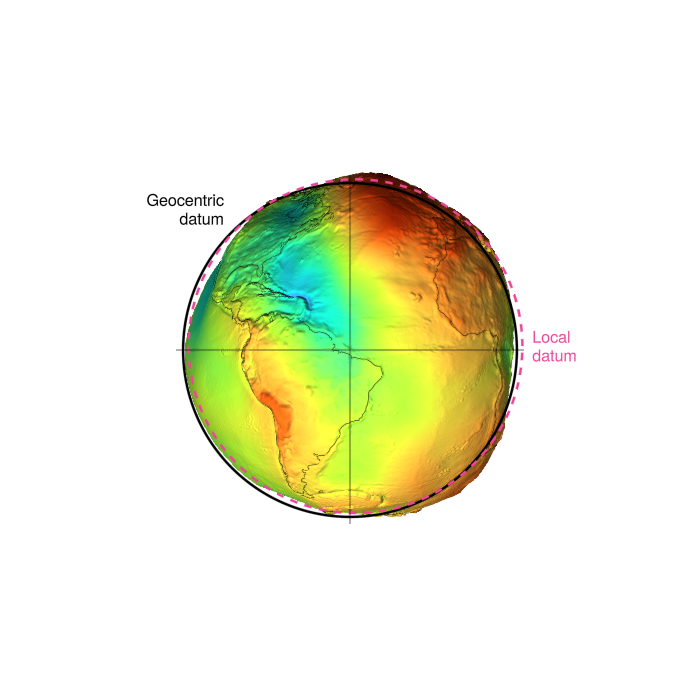
A globe with an exaggerated EGM96 geoid surface, overlaid with the WGS84 geocentric datum and a translated "local" datum to illustrate how regionally-fit ellipsoids deviate from the geocentric reference.
using Rasters, ArchGDAL, Downloads
using GeoMakie, GLMakie
import GeometryOps as GO

path = Downloads.download("https://cdn.proj.org/us_nga_egm96_15.tif")
gravitational_potential_ras = Raster(path) # geoid undulation, metres
┌ 1440×721 Raster{Float32, 2} ┐
├─────────────────────────────┴────────────────────────────────────────── dims ┐
↓ X Projected{Float64} -180.125:0.25:179.625 ForwardOrdered Regular Points,
→ Y Projected{Float64} 90.125:-0.25:-89.875 ReverseOrdered Regular Points
├──────────────────────────────────────────────────────────────────── metadata ┤
Metadata{Rasters.GDALsource} of Dict{String, Any} with 2 entries:
"units" => "metre"
"filepath" => "/tmp/jl_jaMJvE/us_nga_egm96_15.tif"
├────────────────────────────────────────────────────────────────────── raster ┤
extent: Extent(X = (-180.125, 179.625), Y = (-89.875, 90.125))
crs: GEOGCRS["WGS 84",ENSEMBLE["World Geodetic System 1984 ensemble",MEMB...
└──────────────────────────────────────────────────────────────────────────────┘
↓ → 90.125 89.875 89.625 … -89.375 -89.625 -89.875
-180.125 13.6062 13.4928 13.347 -30.6253 -30.0845 -29.5338
⋮ ⋱ ⋮
179.375 13.6062 13.4909 13.3428 -30.6215 -30.0827 -29.5338
179.625 13.6062 13.4918 13.3449 … -30.6234 -30.0836 -29.5338The Proj provided EGM files are slightly weird in format, and thus off by half a pixel from where they should be due to point/area misunderstandings. To fix this, we need to shift the raster by half a pixel.
xdim, ydim = dims(gravitational_potential_ras, (X, Y))
dx, dy = step(xdim), step(ydim)
gravitational_potential_ras = set(gravitational_potential_ras, X => xdim .+ dx/2, Y => ydim .+ dy/2)

fig = Figure(size = (700, 700))
ax  = GlobeAxis(fig[1,1])
sp = surface!(ax, gravitational_potential_ras .* 10_000; colormap = :turbo)
Surface{Tuple{Rasters.Raster{Float64, 1, Tuple{DimensionalData.Dimensions.X{Rasters.Projected{Float64, Rasters.StableRange{Float64}, DimensionalData.Dimensions.Lookups.ForwardOrdered, DimensionalData.Dimensions.Lookups.Regular{Float64}, DimensionalData.Dimensions.Lookups.Points, DimensionalData.Dimensions.Lookups.NoMetadata, GeoFormatTypes.WellKnownText{GeoFormatTypes.CRS}, Nothing, DimensionalData.Dimensions.X{Colon}}}}, Tuple{}, Vector{Float64}, Symbol, DimensionalData.Dimensions.Lookups.NoMetadata, Nothing}, Rasters.Raster{Float64, 1, Tuple{DimensionalData.Dimensions.Y{Rasters.Projected{Float64, Rasters.StableRange{Float64}, DimensionalData.Dimensions.Lookups.ReverseOrdered, DimensionalData.Dimensions.Lookups.Regular{Float64}, DimensionalData.Dimensions.Lookups.Points, DimensionalData.Dimensions.Lookups.NoMetadata, GeoFormatTypes.WellKnownText{GeoFormatTypes.CRS}, Nothing, DimensionalData.Dimensions.Y{Colon}}}}, Tuple{}, Vector{Float64}, Symbol, DimensionalData.Dimensions.Lookups.NoMetadata, Nothing}, Matrix{Float32}}}Drape coastlines onto the (exaggerated) geoid surface itself by sampling the raster at each (lon, lat). This puts them at the same radial distance as the surface so depth testing hides back-of-globe coastlines naturally — no depth_shift hack needed.
draped = GO.transform(GeoMakie.coastlines()) do p
    (p[1], p[2], 10_000 * gravitational_potential_ras[X(Near(p[1])), Y(Near(p[2]))] + 10_000)
end
cl = lines!(ax, draped; color = :black, linewidth = 0.5)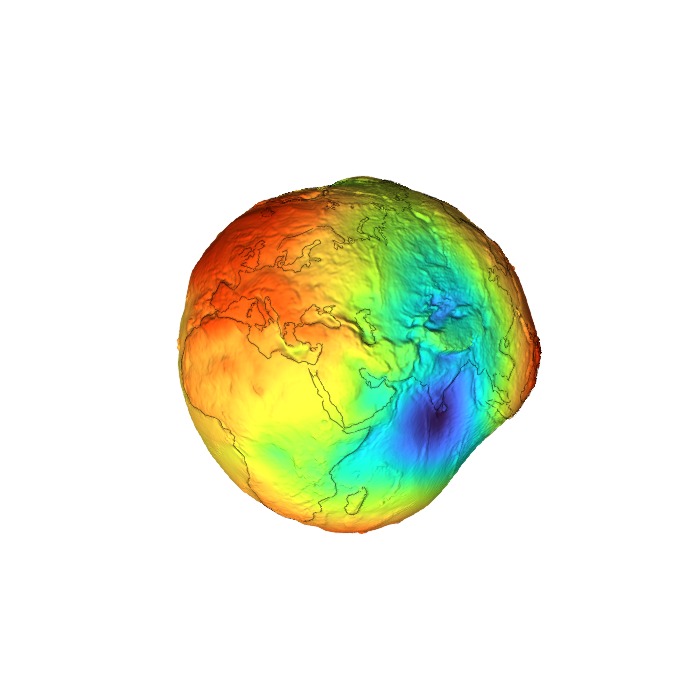
Geocentric datum + local datum silhouettes
Plot two reference ellipsoid silhouettes against the bumpy geoid surface (whose undulation N is exaggerated 10000×): the global geocentric datum (WGS84, centred at Earth's mass centre) as a solid black circle, and a local datum — a regional ellipsoid translated to better fit the geoid in the visible area — as a dashed pink circle. Mirrors r.geocompx.org's 02_datum_fig.png.
using LinearAlgebra: norm, cross, normalize

cc = cameracontrols(ax.scene)
lon, lat, _ = Makie.apply_transform(ax.inv_transform_func[], cc.eyeposition[])

surface_pt = Point3f(Makie.apply_transform(ax.transform_func[], Point3d(lon, lat, 0.0)))
3-element Point{3, Float32} with indices SOneTo(3):
3.684836f6
3.684831f6
3.6652555f6Build screen-aligned orthonormal frame in the plane perpendicular to the (post-orbit) view direction. Flipped so +u1 = screen-right, +u2 = screen-up.
final_eye = Makie.apply_transform(ax.transform_func[], Point3d(lon - 90, 0.0, 0.0))
d̂  = normalize(Vec3f(final_eye))
u1 = -normalize(cross(d̂, Vec3f(0, 0, 1)))   # screen-right
u2 =  normalize(cross(d̂, u1))                # screen-up
a_wgs84 = 6_378_137.0
ts = range(0, 2π; length = 361)
pink = RGBf(0.93, 0.27, 0.6)
Geocentric datum: solid black circle at WGS84 semi-major axis, centred at origin.
geocentric = [Point3f(a_wgs84 * (cos(t) * u1 + sin(t) * u2)) for t in ts]
lines!(ax.scene, geocentric;
       color = :black, linewidth = 2.5, overdraw = true)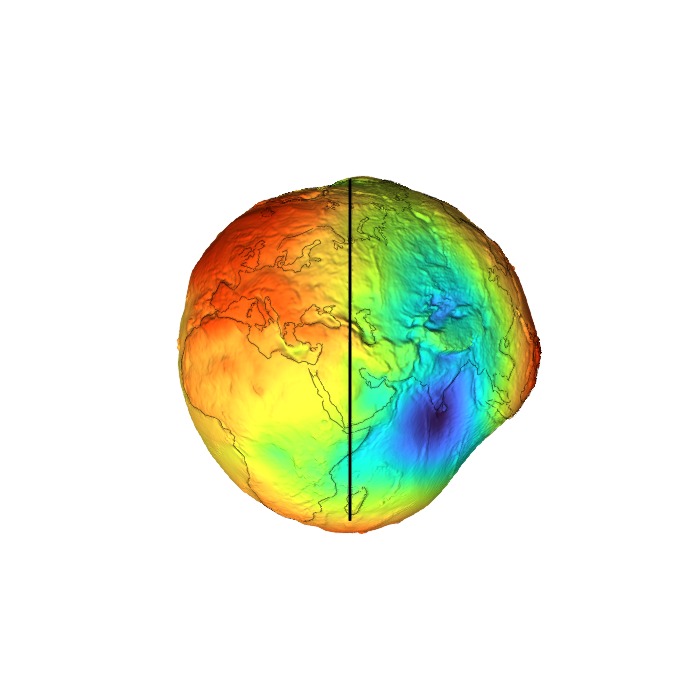
Local datum: pink dashed circle, translated toward the surface region of interest so it bulges out on that side and tucks inside on the opposite — the visual signature of a regionally-fit ellipsoid.
offset = 0.04 * a_wgs84 * normalize(surface_pt)
local_datum = [Point3f(offset + a_wgs84 * (cos(t) * u1 + sin(t) * u2)) for t in ts]
lines!(ax.scene, local_datum;
       color = pink, linestyle = :dash, linewidth = 2.5, overdraw = true)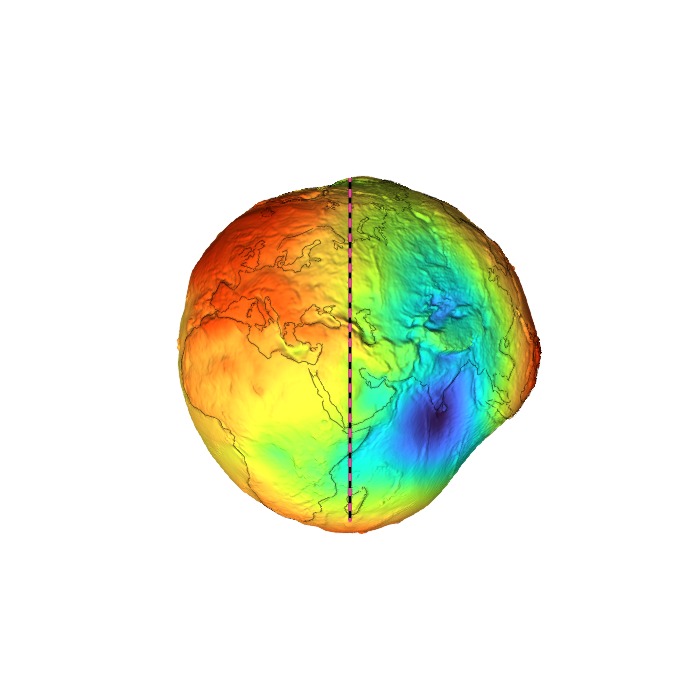
Thin crosshairs through the geocentre, in the view plane.
hl = 1.04 * a_wgs84
lines!(ax.scene, [Point3f(-hl * u1), Point3f(hl * u1)];
       color = :black, linewidth = 0.6, overdraw = true)
lines!(ax.scene, [Point3f(-hl * u2), Point3f(hl * u2)];
       color = :black, linewidth = 0.6, overdraw = true)
Lines{Tuple{Vector{Point{3, Float32}}}}Annotation labels: top-left for Geocentric (index ≈ 135°), right for Local (index ≈ 0°).
text!(ax.scene, geocentric[136];
      text = "Geocentric\ndatum",
      align = (:right, :bottom), offset = (-8, 4),
      fontsize = 16, color = :black, overdraw = true)
text!(ax.scene, local_datum[1];
      text = "Local\ndatum",
      align = (:left, :center), offset = (10, 0),
      fontsize = 16, color = pink, overdraw = true)
Makie.Text{Tuple{Vector{Point{3, Float32}}}}Move the camera 90° around in longitude so the datum line is seen edge-on, and tighten the FOV so the globe fills the square frame.
update_cam!(ax; longlat = (lon - 90, 0.0), fov = 22)
fig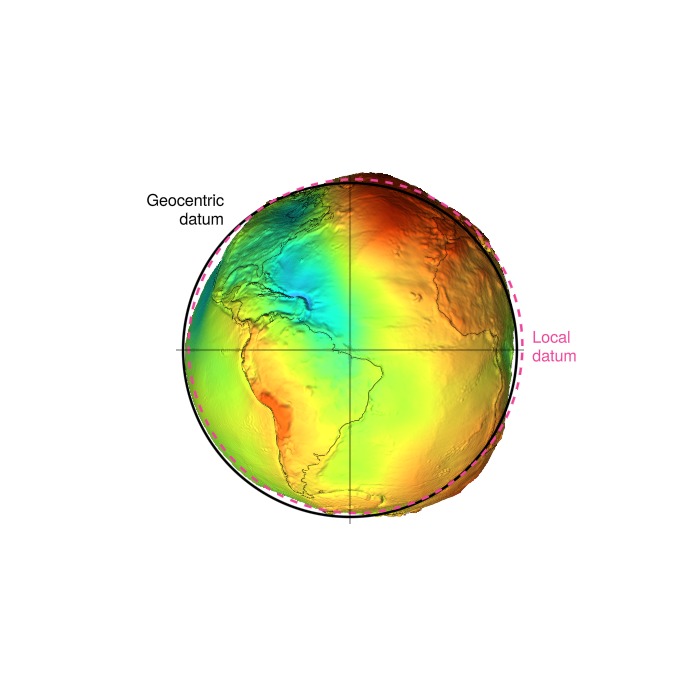
This page was generated using Literate.jl.